Enable GuardDuty for EKS Protection
GuardDuty for EKS Protection provides threat detection for your Amazon EKS clusters by analyzing Kubernetes audit logs and monitoring runtime activity in your containerized workloads.
Overview
GuardDuty EKS Protection includes two key features:
| Feature | Description |
|---|---|
| Kubernetes Audit Log Monitoring | Analyzes EKS audit logs to detect suspicious API activity |
| EKS Runtime Monitoring | Monitors container runtime behavior to detect threats |
Prerequisites
Before enabling EKS protection:
- GuardDuty enabled — Follow the GuardDuty setup guide
- EKS clusters deployed — Have at least one EKS cluster running
- Delegated administrator configured — GuardDuty organization settings deployed
Method 1: Enable via Terraform (Recommended)
The recommended approach is to enable EKS protection through the GuardDuty component configuration.
1 Update GuardDuty Organization Settings
Add the EKS protection settings to your guardduty/org-settings component:
# stacks/catalog/guardduty/org-settings.yaml
components:
  terraform:
    aws-guardduty/org-settings:
      metadata:
        component: guardduty
      vars:
        enabled: true
        admin_delegated: true
        # Enable EKS protection features
        kubernetes_audit_logs_enabled: true
        runtime_monitoring_enabled: true
        runtime_monitoring_additional_config:
          eks_addon_management_enabled: true
          ecs_fargate_agent_management_enabled: true
          ec2_agent_management_enabled: true
2 Apply the Configuration
Deploy the updated GuardDuty settings:
atmos terraform apply aws-guardduty/org-settings -s core-ue1-security
This will:
- Enable Kubernetes Audit Log Monitoring for all member accounts
- Enable Runtime Monitoring with automatic agent management
- Deploy the GuardDuty agent to EKS clusters via the EKS add-on
3 Verify Agent Deployment
Check that the GuardDuty agent is deployed to your EKS clusters:
# List EKS add-ons
aws eks list-addons --cluster-name <cluster-name> --region us-east-1

# Check agent status
kubectl get pods -n amazon-guardduty
Method 2: Enable via AWS Console
If you need to enable EKS protection manually for testing or troubleshooting:
1 Navigate to GuardDuty
Open the AWS Console and navigate to GuardDuty in the security account.
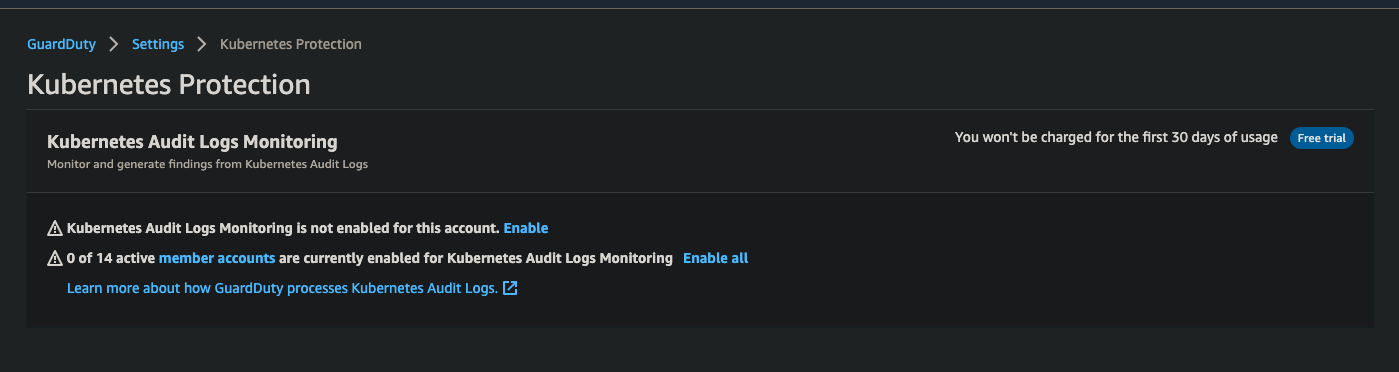
2 Enable Kubernetes Protection
- In the left navigation, select Kubernetes Protection
- Click Configure or Edit
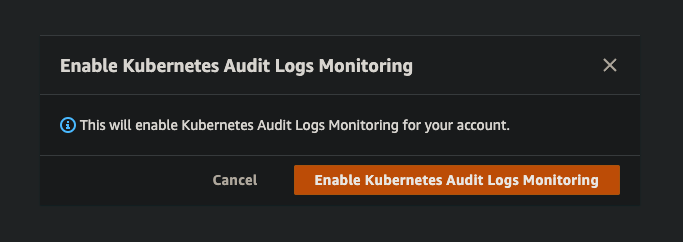
- Enable Kubernetes Audit Logs Monitoring
- Click Save
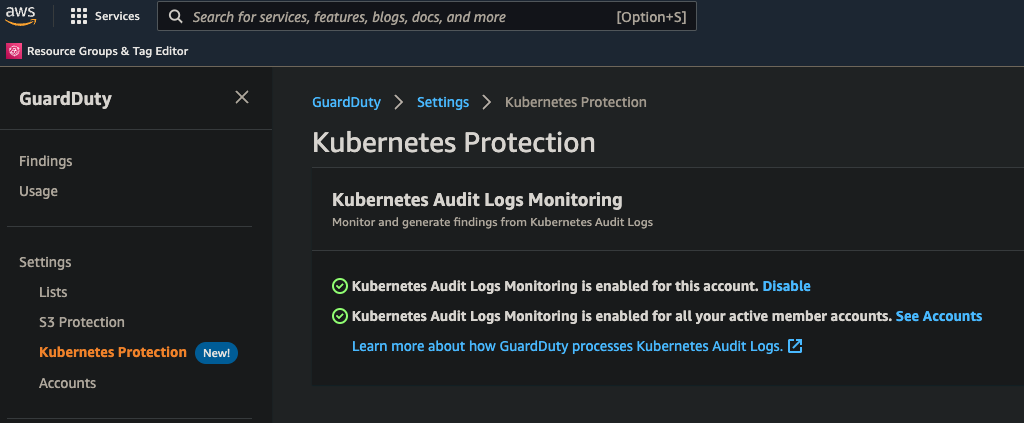
3 Enable for Member Accounts
- Select Accounts in the left navigation
- Select all member accounts
- Click Actions → Enable Kubernetes Audit Logs Monitoring
- Confirm the action
EKS Runtime Monitoring Agent
When Runtime Monitoring is enabled with eks_addon_management_enabled: true, GuardDuty automatically:
- Creates the
amazon-guarddutynamespace in your EKS clusters - Deploys the GuardDuty agent as an EKS add-on
- Manages agent updates automatically
Manual Agent Installation
If automatic management is disabled, install the agent manually:
# Create the add-on
aws eks create-addon \
  --cluster-name <cluster-name> \
  --addon-name aws-guardduty-agent \
  --region us-east-1
Finding Types
GuardDuty EKS Protection detects these threat categories:
| Category | Example Findings |
|---|---|
| Privilege Escalation | Container escape attempts, privileged container launches |
| Credential Access | Kubernetes secrets access, service account token theft |
| Execution | Cryptomining, reverse shells, malicious binary execution |
| Persistence | Unauthorized service creation, DaemonSet deployment |
| Discovery | Kubernetes API enumeration, network scanning |
Troubleshooting
Agent Not Deploying
If the GuardDuty agent doesn't deploy automatically:
- Verify Runtime Monitoring is enabled in GuardDuty settings
- Check the EKS cluster has the required IAM permissions
- Verify the cluster is in a supported region
# Check add-on status
aws eks describe-addon \
  --cluster-name <cluster-name> \
  --addon-name aws-guardduty-agent \
  --region us-east-1
No Findings Appearing
If no findings appear after enabling:
- Allow 15-30 minutes for initial data collection
- Verify the EKS cluster is actively running workloads
- Check CloudWatch Logs for agent errors
See Also
- AWS GuardDuty - Complete GuardDuty documentation
- AWS Security Hub - View aggregated GuardDuty findings
- Setup Guide - Complete deployment instructions